
Documentation Index
Fetch the complete documentation index at: https://docs.zephior.ai/llms.txt
Use this file to discover all available pages before exploring further.
Enterprise-Grade Security for Your Organization
Zephior provides comprehensive security controls to protect your organization’s data and ensure compliance with enterprise security requirements.Multi-Factor Authentication (MFA)
Add an extra layer of security by requiring a second form of verification when signing in.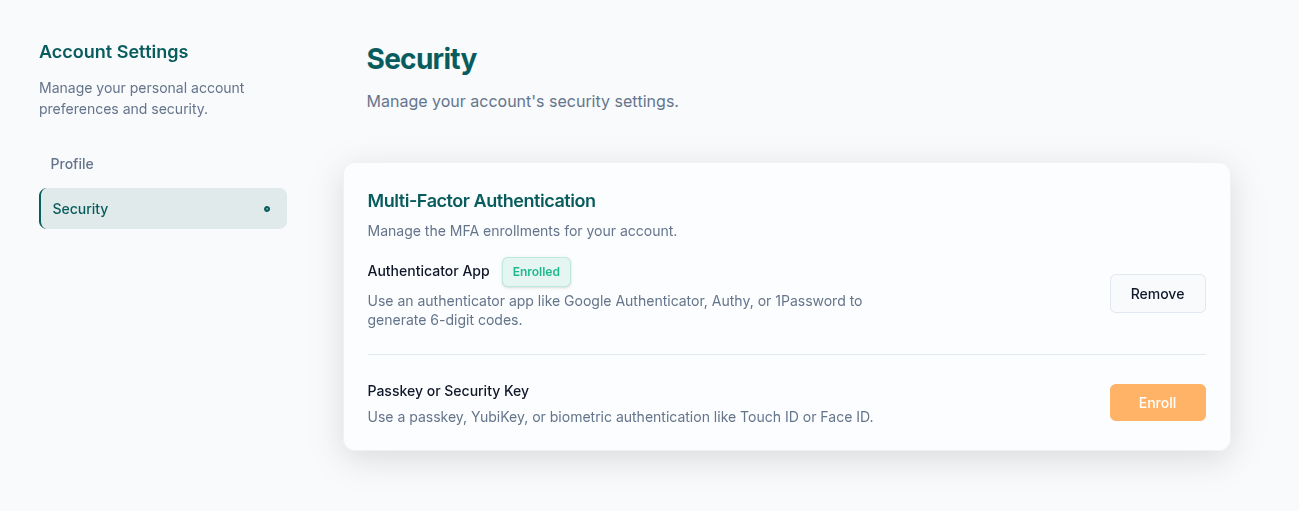
Supported MFA Methods
TOTP Authenticator
Time-based one-time passwords via:
- Google Authenticator
- Authy
- 1Password
- Microsoft Authenticator
WebAuthn / Passkeys
Hardware security keys and biometrics:
- YubiKey, Titan security keys
- Touch ID, Face ID (Mac/iOS)
- Windows Hello
Organization MFA Enforcement
Admins can require MFA for all organization members:- Navigate to Settings → Security
- Enable Require MFA for all members
- Set a grace period for users to enroll (optional)
Trusted Domains: You can skip MFA for users signing in via trusted SSO providers by adding domains to your skip list.
User Self-Enrollment
Individual users can enable MFA for their accounts:- Go to Account Settings → Security
- Click Enable MFA
- Choose your preferred method
- Complete the enrollment process
Password Policy
All Zephior accounts follow our secure password requirements:| Requirement | Setting |
|---|---|
| Minimum Length | 12 characters |
| Lowercase Letters | Required |
| Uppercase Letters | Required |
| Numbers | Required |
| Special Characters | At least one (!@#$%^&*) |
| Repeated Characters | Limited consecutive repeats |
Session Management
Zephior implements secure session handling:| Setting | Value |
|---|---|
| Absolute Timeout | 7 days |
| Inactivity Timeout | 24 hours |
| Token Validation | Industry-standard algorithms |
Data Protection
Encryption
| Layer | Standard |
|---|---|
| Data at Rest | AES-256 encryption |
| Data in Transit | TLS 1.3 |
| Token Validation | Industry-standard algorithms |
Multi-Tenant Isolation
- Each organization has a dedicated, isolated database
- All queries automatically scoped to your organization
- Zero data leakage between tenants
AI Data Handling
- Your content is never used to train public AI models
- AI services configured with zero data retention
- All AI operations processed in European data centers
Compliance Status
| Framework | Status |
|---|---|
| GDPR | Compliant |
| Swiss FADP (nDSG) | Compliant |
| SOC 2 Type II | Certified |
| ISO 27001 | Planned |
Data Residency
- Primary hosting: European data centers
- Swiss hosting option available for Enterprise tier
- All data processing within EU/Swiss jurisdiction
Role-Based Access Control
Zephior uses a full RBAC system with four default roles (Super Admin, Admin, Member, Viewer), custom roles, and per-source access levels. Permissions are enforced at the data level — including AI-powered search, which is pre-filtered by user permissions so users can only search content they have access to.Roles & Permissions
Manage roles, access levels, custom permissions, and the full permission reference
Security Best Practices
Enable MFA for all users
Enable MFA for all users
Organization-wide MFA significantly reduces the risk of unauthorized access, even if passwords are compromised.
Use SSO when available
Use SSO when available
SSO centralizes authentication and lets you enforce your organization’s security policies.
Review audit logs regularly
Review audit logs regularly
Regular audit log reviews help identify unusual activity and ensure compliance.
Use private sources for sensitive content
Use private sources for sensitive content
Keep confidential information in private sources with explicit access grants.
Related Settings
Roles & Permissions
Manage roles, access levels, and permissions
Team Management
Manage users and roles
Audit Logs
Monitor organization activity